สร้างด้วย CometAPIต้องการ API เดียวสำหรับหลายโมเดลใช่ไหมทดสอบเวิร์กโฟลว์ใน Playground แล้วสร้างคีย์ API เมื่อโมเดลและค่าใช้จ่ายเหมาะกับกรณีการใช้งานของคุณ
สำหรับนักพัฒนา CTO ผู้จัดการผลิตภัณฑ์ด้าน AI และผู้สร้าง SaaS Claude Fable 5 API ปลดล็อกความสามารถที่เหนือกว่ารุ่นก่อนอย่าง Opus 4.8 ในงานเขียนโค้ด (80%+ บนชุดทดสอบสำคัญ) พร้อมคงมาตรฐานความปลอดภัยที่เข้มแข็ง คู่มือนี้ให้ข้อมูลครบถ้วนเพื่อพาคุณจากเริ่มต้นจนถึงนำขึ้นผลิตจริง
คำตอบอย่างย่อ:
หากต้องการใช้ Claude Fable 5 API ให้สมัครบัญชี Anthropic หรือใช้ผู้ให้บริการรวมอย่าง CometAPI รับ API key แล้วส่งคำขอ POST ไปยัง Messages endpoint โดยตั้งค่า กำหนดค่า และระบุอาร์เรย์ SDK ทางการสำหรับ Python และ TypeScript ช่วยทำให้ขั้นตอนนี้ง่ายขึ้นอย่างมาก ทั้งยังเอื้อต่อการพัฒนาเอเจนต์อัตโนมัติให้เร็วขึ้น เครื่องมือภายในที่ฉลาดขึ้น และ RAG หรือผู้ช่วยเขียนโค้ดที่เชื่อถือได้มากขึ้น—ตราบใดที่คุณบริหารจัดการต้นทุนและเวลาแฝงอย่างมีประสิทธิภาพ
ข้อแลกเปลี่ยน: ราคาต่อโทเค็นสูงขึ้น และบางครั้งอาจเฟลแบ็กไปยัง Opus 4.8 สำหรับโดเมนที่อ่อนไหว (ไซเบอร์ ชีวะ/เคมี การกลั่นแบบ distillation)
ในทางปฏิบัติ Fable 5 โดดเด่นในสถานการณ์ที่ Sonnet หรือ Opus เคยต้องพึ่งการจัดวางเวิร์กโฟลว์อย่างหนัก เวลานี้ลูปเอเจนต์ที่ซับซ้อนเพียงครั้งเดียวสามารถทำงานแทนการเรียกโมเดลหลายครั้งและโค้ดเชื่อมต่อที่ต้องเขียนเองจำนวนมาก
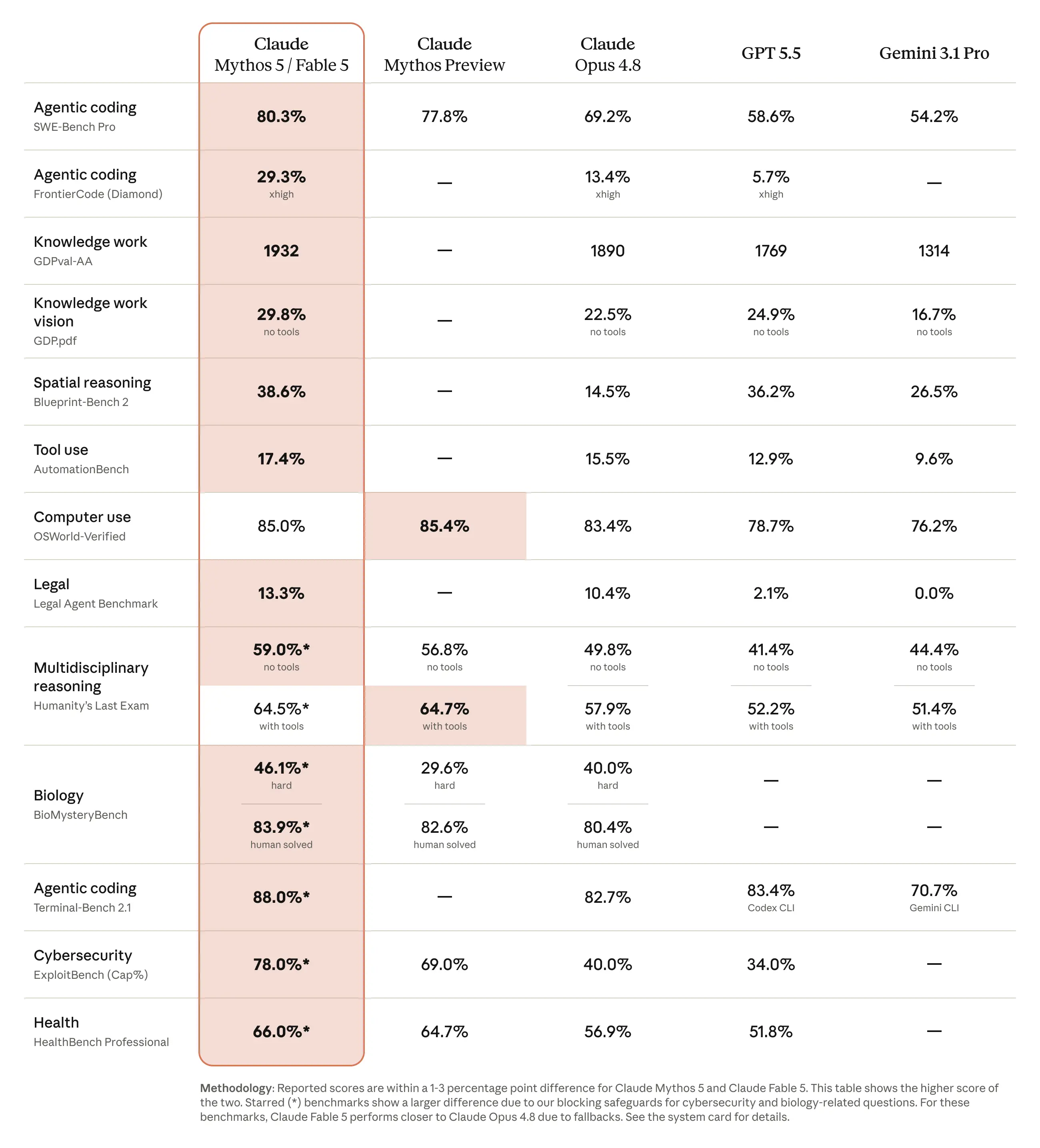
ผลการทดสอบสมรรถนะ: Claude Fable 5 เทียบกับคู่แข่ง
Claude Fable 5 สร้างมาตรฐานใหม่บนชุดทดสอบจำนวนมาก โดยเฉพาะในโจทย์ที่ต้องการพฤติกรรมเชิงเอเจนต์และความทุ่มเทต่อเนื่อง Anthropic รายงานว่าเป็นโมเดลแรกที่ทำคะแนนเกิน 90% บนชุดทดสอบวิเคราะห์หลักสำหรับงานวิเคราะห์ที่ซับซ้อนยาวนาน—เพิ่มขึ้น 10 จุดจาก Claude Opus 4.8
ไฮไลต์สำคัญได้แก่:
SWE-Bench Pro (โค้ดเชิงเอเจนต์): 80.3% — นำหน้า Claude Opus 4.8 (~69%) และคู่แข่งอย่าง GPT-5.5 (~58.6%) อย่างมีนัยสำคัญ
python
import anthropic
client = anthropic.Anthropic() # Reads ANTHROPIC_API_KEY

response = client.messages.create(
model="claude-fable-5",
max_tokens=2048,
system="You are a principal engineer. Be concise, use examples.",
messages=[{"role": "user", "content": "Design a retry strategy for flaky webhooks."}]
)

for block in response.content:
if block.type == "text":
print(block.text)
เคล็ดลับ: สำหรับผู้ใช้ CometAPI เพียงสลับ base URL แทนที่ api.anthropic.com/v1/messages ด้วย api.cometapi.com/v1/messages
การใช้งานขั้นสูง: System Prompts, การสตรีม และการใช้เครื่องมือ
System Prompts เพื่อพฤติกรรมที่สม่ำเสมอ
response = client.messages.create(
    model="claude-fable-5",
    max_tokens=4096,
    system="You are a principal software architect. Prioritize clean, production-ready code with error handling and tests.",
    messages=[...]
)
การสตรีมเพื่อประสบการณ์ผู้ใช้ที่ดีกว่า
จำเป็นสำหรับเอาต์พุตยาว:
with client.messages.stream(...) as stream:
    for text in stream.text_stream:
        print(text, end="", flush=True)
tools = [
{
"name": "get_order_status",
"description": "Look up the status of a customer order by ID.",
"input_schema": {
"type": "object",
"properties": {"order_id": {"type": "string"}},
"required": ["order_id"],
},
}
]
#Pass tools to the request messages in the same way as you would pass parameters
messages = [{"role": "user", "content": "What's the status of order A1855?"}]
response = client.messages.create(
model="claude-fable-5",
max_tokens=1024,
tools=tools,
messages=messages,
)
if response.stop_reason == "tool_use":
    tool_use = next(b for b in response.content if b.type == "tool_use")

    # Run your real function with the model's chosen input
    result = lookup_order(tool_use.input["order_id"])  # your code

    messages.append({"role": "assistant", "content": response.content})
    messages.append({
        "role": "user",
        "content": [{
            "type": "tool_result",
            "tool_use_id": tool_use.id,
            "content": result,
        }],
    })

    # Send the result back; the model now answers using it
    followup = client.messages.create(
        model="claude-fable-5",
        max_tokens=1024,
        tools=tools,
        messages=messages,
    )
Claude Fable 5 API ยกระดับมาตรฐานใหม่สำหรับโมเดลแนวหน้าที่ทั้งเก่งและปลอดภัย ด้วยการทำตามคู่มือนี้—เริ่มจากง่าย เพิ่มการสตรีมและเครื่องมือ ปรับต้นทุน และใช้โครงสร้างพื้นฐานที่เชื่อถือได้—คุณสามารถสร้างระบบระดับผลิตที่ส่งมอบคุณค่าได้ตั้งแต่วันนี้